

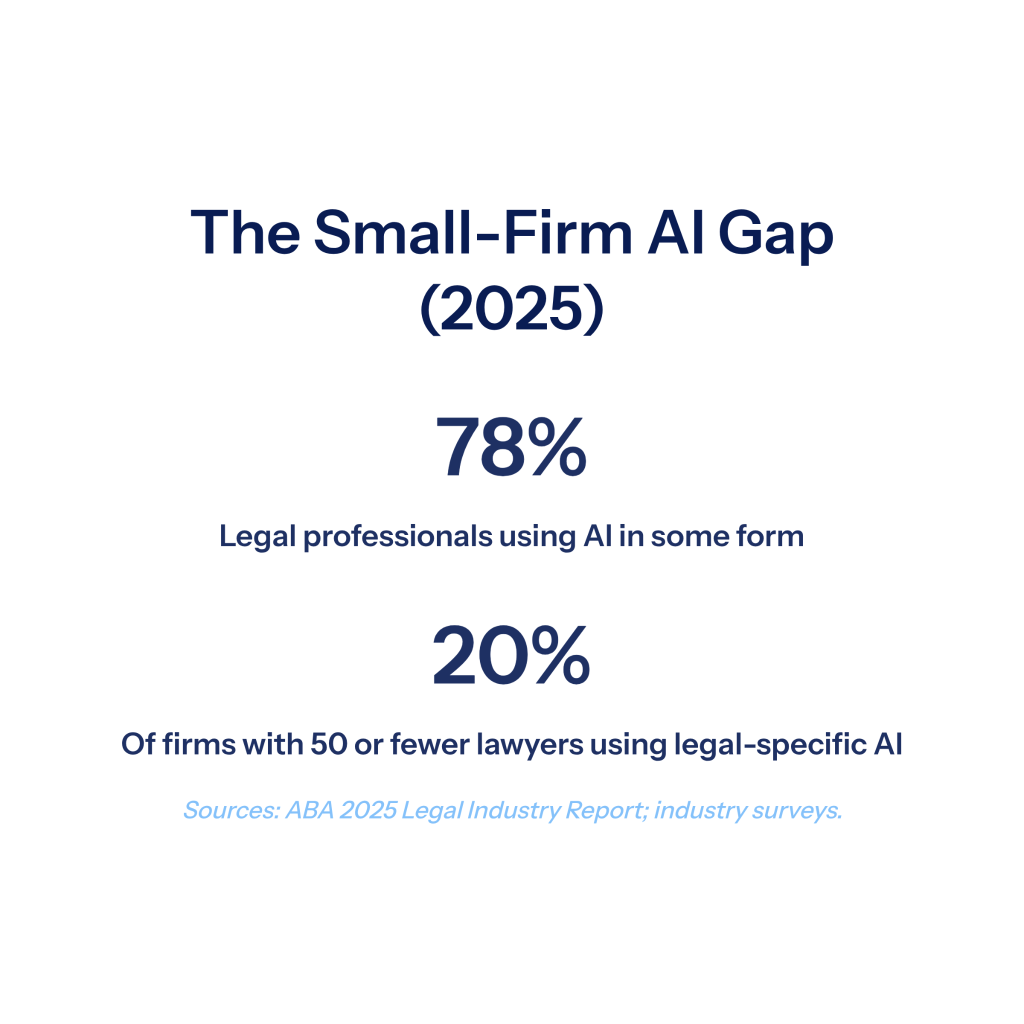
AI has moved from novelty to necessity in the legal profession, and small firms now face a clear choice: adopt thoughtfully or fall behind. By 2025, 78% of legal professionals reported using AI in some form, but only about 20% of firms with 50 or fewer lawyers had implemented legal-specific AI tools. At DocuLex, we built our litigation platform after watching civil litigation attorneys spend days on tasks that machines now complete in minutes, and the gap between AI-equipped and AI-absent firms continues to widen each quarter.
This guide walks through where small firms stand today, what AI actually does well in a litigation practice, how to choose and roll out tools without exposing your firm to ethics risk, and what to expect over the next two years.
The State of AI Adoption in Small Law Firms
Adoption is moving fast. According to a recent Wisconsin Law Journal report, AI use in the legal industry has surged across firm sizes, with usage moving from occasional experimentation into daily workflow.
The American Bar Association’s 2025 report found a meaningful split between large and small firms. Roughly 20% of firms with 50 or fewer lawyers have implemented legal-specific AI tools across the firm, about half the rate of larger firms. The same report noted that small firms often show greater agility once they commit, since decisions move through fewer layers of approval.
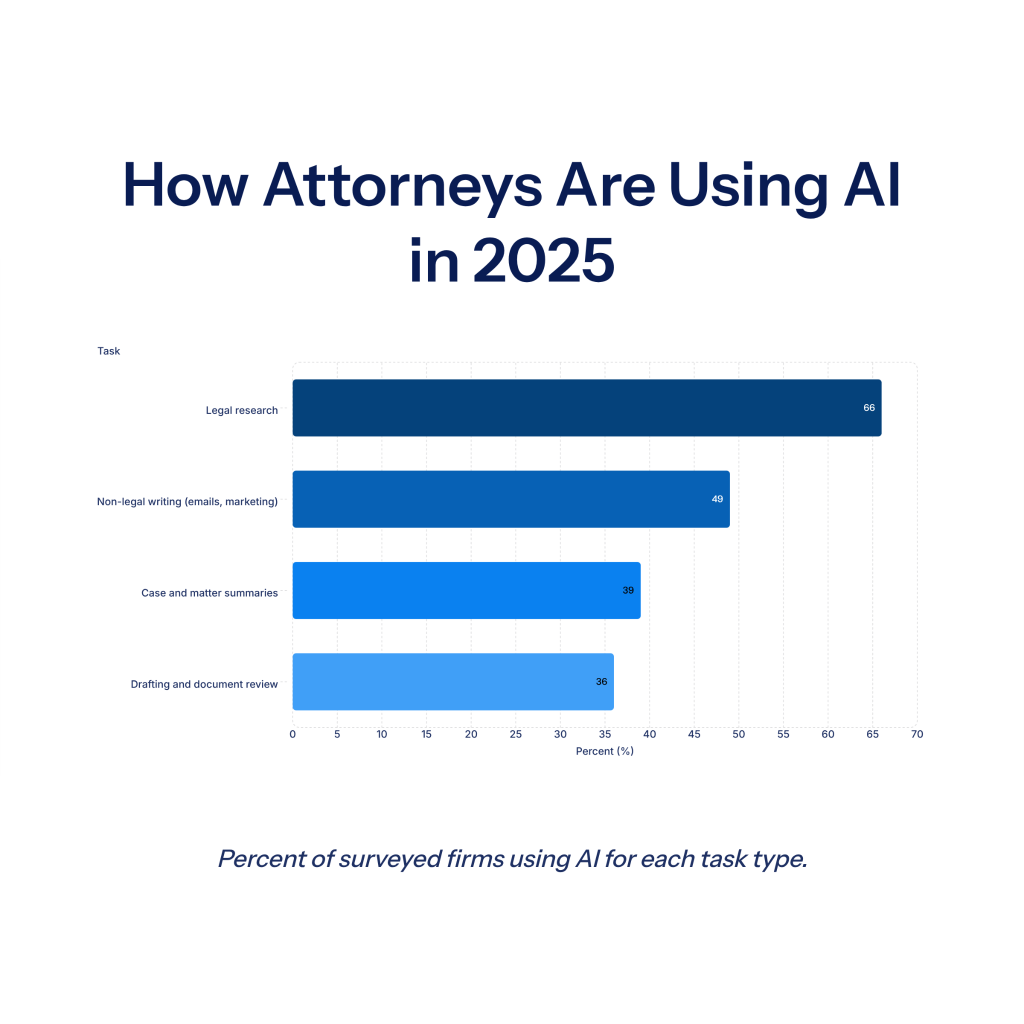
Where attorneys are using AI most often:
- Legal research: Around 66% of surveyed firms use AI for case law and statutory research
- Drafting and review: About 36% of firms use AI for first drafts and document review
- Case summaries: Approximately 39% use AI to summarize matters and depositions
- Non-legal writing: Roughly 49% use AI for emails, marketing, and internal communication
The trend across all of these categories is the same: tasks that used to consume hours of associate or paralegal time are increasingly being handled in minutes by AI tools, with attorney review on the back end.
Why Small Firms Have Been Slower to Adopt
Three reasons surface repeatedly in our conversations with attorneys.
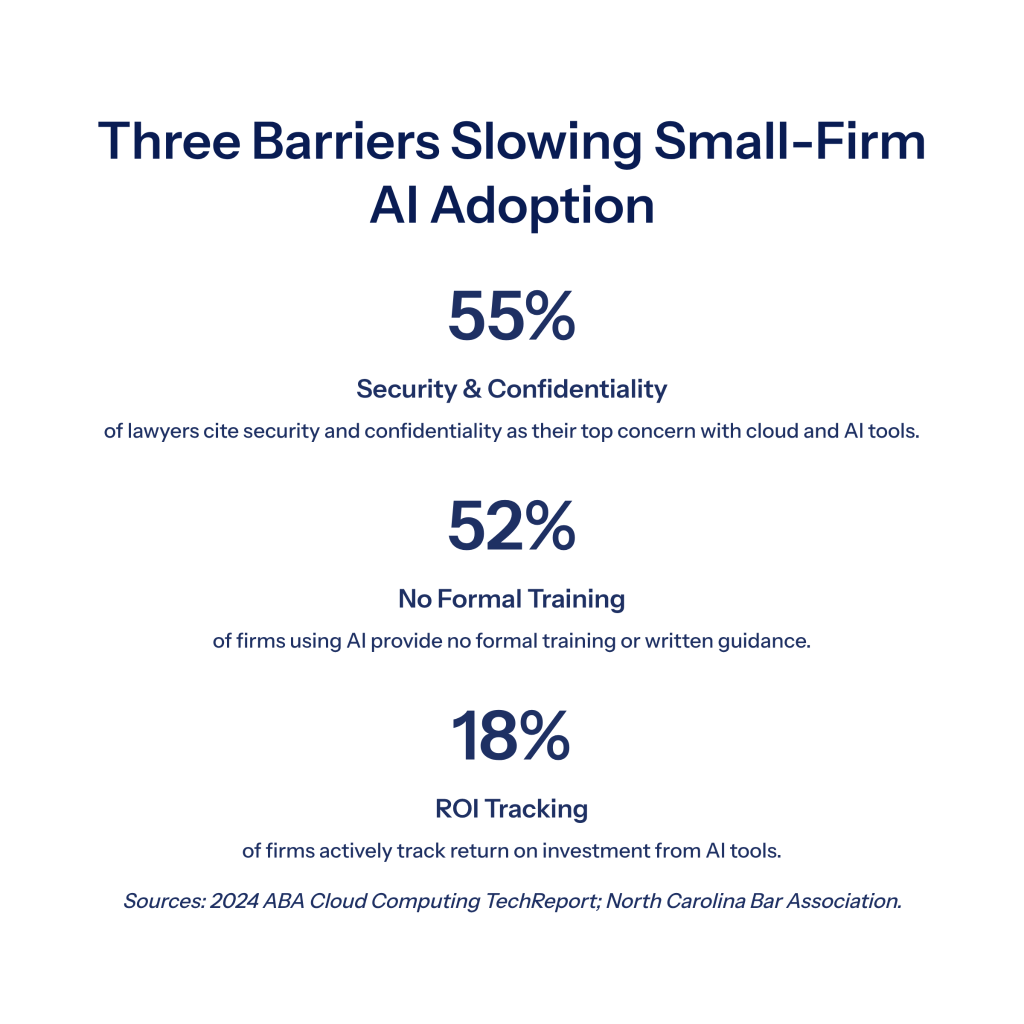
The first is uncertainty about ethics rules and confidentiality. The 2024 ABA Cloud Computing TechReport found that around 55% of lawyers cite security and confidentiality as their top concern with cloud-based and AI tools. About 33% of non-adopters explicitly named security risk as the reason they have not started.
The second is the absence of a clear training plan. According to the North Carolina Bar Association, 52% of firms that use AI provided no formal training or written guidance to their lawyers and staff. That creates two problems at once: people use AI in ways the firm cannot see, and partners cannot tell whether the investment is paying off.
The third is the difficulty of measuring return on investment. The same NC Bar analysis found that only about 18% of firms track ROI on their AI tools. Without metrics, it becomes hard to justify expanding adoption beyond the early users.
The Core Benefits of AI for Small Law Firms
When small firms adopt AI thoughtfully, the benefits compound quickly.
Time savings on routine work. Drafting, document review, medical records summarization, deposition prep, and discovery responses can all be accelerated dramatically. We regularly see medical billing summaries that took paralegals two or three days reduced to seconds of automated processing, with the attorney reviewing rather than building from scratch.
A competitive edge against larger firms. Small firms historically competed on price and personal attention. AI lets them also compete on speed and depth of preparation. A solo practitioner with the right tools can produce work product that rivals a team of associates.
Better client service. Faster turnaround on demand letters, settlement analyses, and discovery responses translates directly into faster case resolution and happier clients. Clients increasingly expect digital responsiveness from their counsel.
Scalability without proportional hiring. Adding capacity used to mean hiring associates or paralegals. AI lets each existing team member handle a larger caseload without sacrificing quality. For firms growing in personal injury or commercial litigation, this is often the difference between turning matters away and accepting them.
A litigation attorney we spoke with summarized it well: the firms that win the next decade will be the ones that pair experienced lawyers with AI that handles the mechanical work, freeing those lawyers to focus on strategy and advocacy.
Where Small Law Firms Are Using AI Today
The use cases that deliver the clearest ROI tend to fall into a few categories.
Legal Research and Case Analysis
AI research tools can scan case law, statutes, and regulations far faster than manual searching. They work best when used to surface relevant authority quickly so attorneys can spend more time on analysis and judgment. Verification still matters because hallucinated citations remain a real risk, and several state bars have sanctioned attorneys for filings that contained AI-fabricated case names.
Document Drafting and Generation
This is one of the highest-impact areas for litigation firms. AI-assisted drafting now produces strong first drafts of:
- Demand letters anchored in the actual case file
- Discovery responses pulled from stored materials
- Pleadings and motion templates
- Client correspondence
- Pre-trial orders and witness lists
At DocuLex, we focus specifically on legal document automation that pulls drafts from a firm’s own case file rather than from a generic legal database. The output is meant to operate at an associate-attorney level of completeness, with the supervising attorney reviewing and refining before filing.
Document Review and Medical Records Processing
For personal injury firms in particular, medical record analysis is one of the most time-consuming tasks in the practice. Visit-by-visit summaries, billing code extraction, and chronological treatment timelines used to require days of paralegal work per case. AI medical records processing now handles the post-retrieval stage of these records, organizing complaints, evaluations, diagnoses, and treatments into a usable format. Our platform handles this stage of the workflow specifically, working with records the firm has already obtained from providers and turning them into structured summaries.
Client Intake and Communication
AI-driven intake tools can capture lead information, screen cases, and even draft initial response emails. For small firms without a full-time intake coordinator, this can recover significant lost revenue from leads that previously went unanswered after hours.
Administrative and Practice Operations
Calendaring, invoicing, time tracking, and meeting summaries are increasingly automated through AI features built into the office software firms already use. These are usually the easiest wins for firms just starting with AI.
Categories of AI Tools to Consider
Most small firms end up combining several types of tools rather than relying on one platform for everything. The categories below are how we often think about the landscape when advising attorneys on what to evaluate.
| Category | What It Does | Typical Use Case |
| Litigation document automation (where DocuLex operates) | Drafts demand letters, discovery responses, pleadings, and medical summaries from your own case files | Personal injury and civil litigation firms looking to reduce drafting time |
| Legal research platforms | Search case law, statutes, and regulations with natural language queries | Any firm doing substantive legal research |
| Practice management software | Manages matters, billing, calendaring, and client communications | Firms needing centralized matter management |
| E-discovery and review tools | Processes large document productions, identifies privilege, surfaces relevant materials | Commercial litigation and document-heavy matters |
| General-purpose AI assistants | Drafts emails, summarizes meetings, generates marketing copy | Administrative and non-confidential writing tasks |
A common mistake is to evaluate only general-purpose AI tools and assume they cover litigation needs. They do not. General AI was not built with HIPAA, attorney-client privilege, or court-formatted output in mind. Litigation-specific platforms exist precisely because the workflow requirements differ from generic business AI.
How to Choose the Right AI Tools
A few questions worth asking before any purchase decision:
- Does the tool handle your actual workflow? A great tool for contract review may be useless for a personal injury practice doing medical records analysis. Match capabilities to caseload.
- What is the security and compliance posture? For firms handling protected health information, HIPAA compliance is non-negotiable. Ask whether the vendor has a Business Associate Agreement in place with any subprocessors.
- How does the tool handle your data? Is it training models on your case files? Does it retain medical records after analysis? Where is data stored and encrypted?
- What is the realistic cost over a year? Subscription pricing is straightforward. Usage-based AI pricing (input tokens, output tokens, embeddings) requires more modeling, especially for high-volume firms.
- How well does it integrate with your existing systems? A tool that requires duplicate data entry will get abandoned.
We recommend piloting one tool at a time with a narrowly defined use case before committing firm-wide.
A Practical AI Implementation Roadmap
Most successful rollouts we have seen follow a similar pattern.
1. Identify your top three time sinks. Ask each attorney and paralegal where they lose the most hours each week. The answers usually cluster around drafting, medical records, discovery responses, and case summaries.
2. Pilot one tool against one of those time sinks. Pick a single use case, set a 30 to 60 day evaluation window, and measure how much time the tool actually saves.
3. Train the team properly. Provide written guidelines, not just verbal walkthroughs. Make it clear what tasks AI is approved for, what requires verification, and what is off limits.
4. Document your verification process. Every AI output that goes to a client, a court, or opposing counsel needs human review. Build that step into the workflow rather than treating it as optional.
5. Track ROI from day one. Hours saved per matter, turnaround time on key documents, and attorney satisfaction are all reasonable metrics. Without numbers, you cannot defend the investment internally.
6. Scale only after the pilot proves out. Resist the urge to roll out three tools at once. The firms that succeed with AI tend to add capabilities deliberately.
The Traffic Light Framework for AI Use
A growing number of bar associations recommend a simple classification system for internal AI policies, modeled on traffic light colors. The North Carolina Bar Association’s framework is one of the cleanest articulations.
- Red (prohibited): Entering confidential client data into public AI models with no security review. Using AI to make unverified factual or legal conclusions in filings.
- Yellow (allowed with caution): AI-assisted research, drafting, and document review. Requires verification of all citations and outputs before use.
- Green (unrestricted): Internal communications, marketing copy, scheduling, and other low-risk administrative work.
This framework does two things at once: it gives lawyers permission to use AI productively, and it draws clear lines around the highest-risk uses. Banning AI outright tends to backfire, since it just pushes use into the shadows where the firm has no visibility.
Ethics, Confidentiality, and Compliance
Small firms face the same ethics rules as large firms, and the regulatory picture is moving fast.
Confidentiality. Do not feed sensitive client data into AI tools without verifying their security posture and data handling policies. For medical records in particular, HIPAA compliance and a clear no-retention policy on protected health information are baseline requirements. Our platform was built around HIPAA compliance from the start, with server-side encryption, isolated firm data, and a Business Associate Agreement covering medical record processing.
Competence. Most state bars now require attorneys to understand the technology they use. The NYC Bar Formal Opinion 2025-6 addressed AI tools that record, transcribe, or summarize client conversations, holding that attorneys must obtain client consent and verify the accuracy of the AI output before relying on it.
Verification. Treat AI outputs as starting points that require attorney review. Hallucinated case citations have already led to real sanctions. Every cite check, every factual statement, and every legal conclusion needs attorney review before it leaves the firm.
Disclosure. Some jurisdictions now require disclosure when AI was used to draft or assist with court filings. Check current rules in every venue where your firm appears.
For ongoing guidance, the JD Supra small firm summary is a useful starting point that compiles ethics opinions and best practices in one place.
Common Challenges and How to Address Them
A few obstacles come up almost every time a small firm adopts AI.
Accuracy concerns. Approximately 30% of lawyers report distrust of AI accuracy. The fix is workflow design: treat AI output as a draft, build verification into every step, and choose tools that ground their output in your own case files rather than generating responses from general training data.
Training gaps. Without training, lawyers either avoid AI entirely or use it without judgment. Both outcomes are bad. Schedule formal training sessions, document approved use cases, and give people a clear escalation path when something looks wrong.
Confidentiality risk. Public AI tools and confidential client data are a poor combination. Use legal-specific platforms for anything involving privileged or HIPAA-regulated information, and reserve general-purpose AI for non-confidential tasks.
Regulatory uncertainty. Rules are evolving in real time. Designate one attorney or office manager to monitor bar association updates and adjust the firm’s AI policy at least quarterly.
What’s Coming Next: AI Trends for 2026 and Beyond
Three trends are worth watching closely.
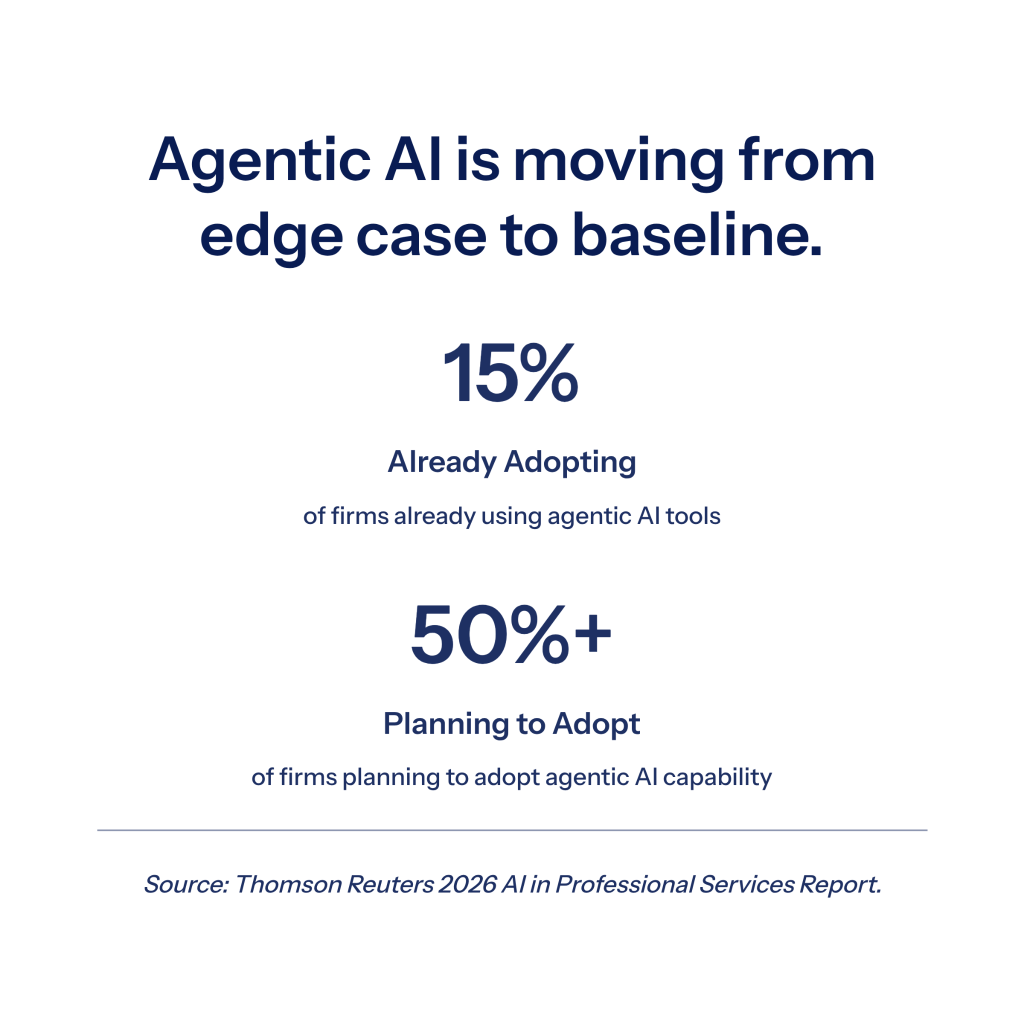
The first is agentic AI. Self-directed AI agents that can complete multi-step tasks with minimal supervision are beginning to emerge in legal practice. For litigation work, agentic AI may eventually handle full discovery response drafts, settlement analyses, and demand letter generation end-to-end, with attorney review at the final step.
The second is deeper integration with case files. The most useful AI for litigation grounds its output in your firm’s own materials rather than relying on training data from the public internet. Platforms that combine document storage, retrieval, and generation in one place tend to outperform tools that operate in isolation. Our work at DocuLex sits here, focusing on evidence management and document automation rather than generic case management.
The third is the closing window for early-mover advantage. As AI becomes baseline expected technology, the competitive lift from adopting early decreases. Firms still on the sidelines in 2026 will increasingly be competing against AI-equipped peers on price, speed, and quality, with no offsetting advantage.
Frequently Asked Questions
The questions below come up most often in conversations with small firm attorneys evaluating AI tools.
What Is the Best AI Tool for a Small Law Firm?
There is no single best tool. The right choice depends on your practice area, firm size, and primary time sinks. Personal injury and civil litigation firms tend to benefit most from medical records processing and demand letter automation, which is where DocuLex focuses. Our platform pulls drafts directly from your case files to handle medical chronologies, demand letters, discovery responses, and pleadings at an associate level, with HIPAA-compliant infrastructure for the protected health information that comes with PI work. Commercial litigation firms benefit more from e-discovery and contract review, which sit outside our scope. Most firms end up using two or three specialized tools rather than one universal platform, typically pairing a litigation-specific platform with a separate legal research tool and their existing practice management software.
Is AI Safe for Confidential Legal Work?
It can be, with the right tools and policies. Public AI chatbots are generally not appropriate for confidential client data, since the security posture is unclear and the terms of service may permit training on user inputs. Legal-specific platforms with HIPAA compliance, encryption, and clear data handling policies are designed for confidential work, and their security posture should be confirmed before use.
How Much Does AI for Law Firms Cost?
Costs vary widely by tool category and pricing model. Some platforms charge a flat monthly subscription per user, while others use a usage-based model tied to AI processing volume (input tokens, output tokens, and document embeddings). The right way to evaluate cost is hours saved per matter against the monthly investment, rather than headline price alone.
Can Solo Attorneys Realistically Use AI?
Yes, and they often see the largest relative gains. Solos cannot hire associates to absorb routine drafting and review work, so AI fills that role directly. The implementation roadmap is the same as for larger firms: pick one use case, pilot one tool, measure the result, then scale.
Do I Need to Tell Clients I Use AI?
Disclosure rules vary by jurisdiction. Some bars and courts now require disclosure of AI use in filings, while others do not. As a baseline, attorneys should be transparent with clients about how AI is used on their matters, especially when the tools record or summarize client communications. Verify current rules with your state bar before adopting any tool that touches client data.
How Do I Build an AI Policy for My Firm?
Start with the traffic light framework outlined above. Identify what is prohibited, what requires verification, and what is unrestricted. Put it in writing, train the team, and review it at least twice a year as new tools and ethics opinions emerge.
Ready to Reduce Your Firm’s Drafting Workload?
If your firm spends meaningful time on demand letters, discovery responses, medical records analysis, or routine pleadings, AI can give you that time back. To see how DocuLex handles litigation document automation for civil litigation and personal injury firms, join the waitlist for a free demo.