

To choose case management software for your law firm, document your current workflow gaps, define must-have features with input from the attorneys and staff who will use the system daily, decide between cloud and on-premises deployment, shortlist vendors with proven legal industry experience, run demos and trials against your real use cases, and plan for data migration and training before signing a contract. The right platform should centralize matters, deadlines, billing, and communications in one system your team will actually adopt.
At DocuLex, we build AI-powered litigation document automation and evidence management software for civil litigation firms, which means we typically work alongside case management systems rather than replace them. That gives us a useful vantage point. We see which case management choices make life easier for litigation teams and which ones create friction that no amount of training can fix. Firms that pick software based on a clear feature checklist and realistic implementation planning tend to adopt it fully. Firms that buy on vendor marketing or a single partner’s preference often end up with expensive shelfware within a year.
The ABA 2023 Practice Management TechReport found that 53% of firms now use case management software, climbing to 78% in firms with 50 to 99 lawyers. The tools have matured. The question now is which one fits your firm.
What case management software actually does
Case management software (sometimes called practice management software) organizes everything related to a matter in one place. A working system gives you a single record for each case that connects client contacts, documents, emails, deadlines, tasks, time entries, and invoices.
At minimum, a capable case management platform handles:
- Matter and contact management with conflict checking and related-matter links
- Calendar and deadline tracking tied to the case, often with rules-based calendaring for court deadlines
- Document management linked to each matter, with version control
- Time tracking, billing, and trust accounting to meet ethical and IOLTA requirements
- Client communication tools, including portals or email integration that logs messages to the right matter
- Reporting and dashboards on case status, productivity, and firm finances
A common point of confusion is the line between case management and adjacent tools. Case management is the central system of record for your matters. Document automation platforms, evidence management software, e-discovery tools, and AI drafting assistants all plug into or sit alongside that system. We cover how these fit together later in this guide.
Why firms adopt case management software
The ABA survey numbers tell part of the story, but the practical reasons firms move to a dedicated platform come down to four benefits that show up quickly.
Fewer missed deadlines and malpractice risks. The State Bar of Wisconsin has noted that cloud-based practice management systems deliver increased efficiency and mobility while helping attorneys avoid malpractice through automated deadline and conflict checking. Calendaring failures are one of the most common malpractice claim types, and rules-based systems reduce that exposure.
Less administrative work, more billable time. When contact updates, document saves, and time entries happen inside the case record, staff spend less time on low-value data entry. That time flows back into client work.
Better data security and continuity. Cloud systems handle backups, patching, and disaster recovery automatically. On-premises systems give you direct control but require your own IT discipline to match cloud reliability.
Firm scalability. When a firm grows from ten to thirty attorneys, a case management system that scales cleanly is the difference between a smooth transition and a year of operational chaos.
Core features to evaluate
Not every firm needs every feature. Focus your evaluation on what your team will actually use day to day.
Matter and contact management. Look for conflict checking that runs at intake, relationship mapping between contacts, and the ability to see every matter connected to a person or entity in one view.
Document management and assembly. The system should save incoming and outgoing emails to the correct matter, maintain version history, and support document templates for common pleadings and forms. If your firm produces high volumes of pleadings, discovery, or demand letters, ask whether document assembly is native or requires a plugin.
Calendaring and workflow automation. Rules-based calendaring (which calculates deadlines from court rules) is especially valuable for litigation firms. Workflow templates let you standardize how each matter type moves through the firm.
Time tracking, billing, and trust accounting. Built-in trust accounting that meets your state bar’s IOLTA rules is non-negotiable. If a system lacks it, you will need a separate accounting platform, which creates its own integration headache.
Client communication and portals. Secure portals let clients upload documents, check case status, and message you without cluttering your inbox. Email integration that auto-files messages to the matter saves hours per week.
Reporting and analytics. Dashboards on case status, originating attorney revenue, staff utilization, and aging receivables turn raw data into management insight.
Mobile access and security posture. Full-featured mobile apps, two-factor authentication, encryption in transit and at rest, and detailed audit logs should all be standard by 2026.
Integrations. Outlook or Google Workspace sync, e-signature, payment processing, and accounting integration (QuickBooks, Xero, or built-in) are the most common and most important integrations to verify in a demo.
When we work with litigation firms on document-heavy workflows, we see a recurring pattern: firms that prioritize strong document management at the case management selection stage have an easier time layering in AI document automation and medical records processing later. Weak document management is one of the hardest problems to fix after the fact.
Cloud vs. on-premises: which deployment model fits your firm
Most modern legal case management systems are cloud-based, but on-premises still has a place for firms with specific security, regulatory, or IT reasons to host their own infrastructure.
| Factor | Cloud (SaaS) | On-Premises |
| Deployment | Hosted by the vendor, accessed through a browser or mobile app | Installed on your firm’s servers, managed by internal or contracted IT |
| Cost structure | Predictable per-user monthly subscription | High upfront license plus annual maintenance fees |
| Upgrades and patches | Handled automatically by the vendor | Manual, scheduled by your IT team |
| Access and mobility | Available anywhere with an internet connection | Requires office network or VPN |
| Data control | Stored by the provider under their security controls | Stored on your hardware, under your controls |
| Backup and disaster recovery | Provider-managed, often geographically redundant | Your responsibility to configure and test |
| Scalability | Add users instantly; vendor absorbs infrastructure scaling | Scaling often requires new hardware |
| Best fit | Most solo, small, and mid-sized firms; remote or hybrid teams | Large firms with dedicated IT, strict data residency needs, or legacy workflows |
For most civil litigation firms under 100 attorneys, cloud is the default choice in 2026. The 2024 ABA Legal Technology Survey showed AI adoption nearly tripling year over year, and almost all of that adoption is cloud-based. Choosing an on-premises platform today can limit your ability to layer in modern AI tools that assume cloud infrastructure and API access.
How case management software fits with other legal tech
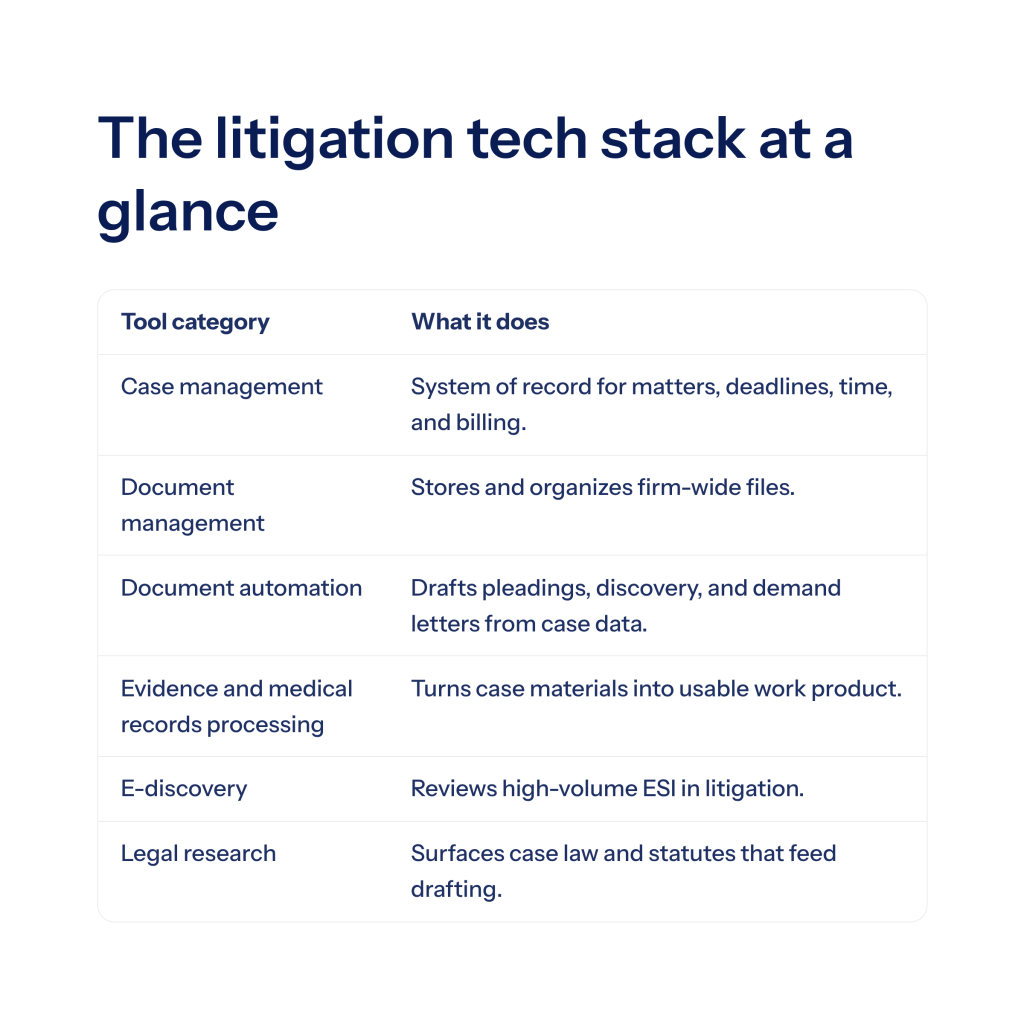
One of the most common mistakes we see is treating case management as the only software decision that matters. It is the hub, but the litigation tech stack usually includes several categories that work together.
- Case management software is the system of record for matters, contacts, deadlines, time, and billing.
- Document management systems (sometimes built into case management, sometimes separate) store and organize files at the firm level.
- Document automation and AI drafting tools generate pleadings, discovery responses, demand letters, and correspondence from structured case data.
- Evidence management and medical records processing platforms like DocuLex handle the downstream work of turning case materials (medicals, depositions, produced documents) into usable work product.
- E-discovery tools handle large-volume ESI review in litigation that calls for it.
- Legal research platforms sit outside the case record and feed into drafting.
When you evaluate a case management platform, ask which of these categories it covers natively, which it integrates with, and which you will need to add separately. A system that advertises “AI built in” but only surfaces basic summarization is very different from one that connects cleanly to dedicated tools for legal document automation and evidence processing.
Questions to ask every vendor
By the demo stage, you should be driving the conversation with specific questions, not just watching a canned walkthrough.
- How long does a typical implementation take for a firm our size and practice area?
- How is our existing data migrated, and who does the work?
- What does training look like, and is it included in the subscription?
- What is your uptime history over the past 24 months?
- How do you handle security incidents, and what is your breach notification process?
- Is the system HIPAA-compliant if we handle medical records?
- What integrations are native, and which require third-party connectors?
- How is pricing structured, and what happens if we add or remove users mid-term?
- Who owns our data, and how do we export it if we leave?
- What is your product roadmap for the next 12 months?
Data portability (that last question) matters more than people expect. A system you stay with only because switching is painful becomes a tax on every future decision.
A step-by-step process for choosing the right system
A structured process produces better decisions than a comparison chart alone.
1. Audit your current workflow. Map how a matter moves through your firm today, from intake to closure. Note every place where data is rekeyed, every missed deadline, and every tool your team uses in parallel. This is your baseline and your requirements list.
2. Get input from the people who will use it. Attorneys, paralegals, billing staff, and intake coordinators all see different pain points. Build your feature priorities from their input, not just from leadership’s.
3. Set a realistic budget and timeline. Factor in subscription fees, implementation, data migration, training, and at least three to six months of productivity dip during the transition. Most firms underestimate the time and cost of implementation, so build a meaningful contingency into both your budget and your go-live date.
4. Shortlist three to five vendors. Focus on providers with real legal industry experience and a track record with firms of your size and practice area. Check independent reviews on sites like G2 or Capterra, and ask for references from firms similar to yours.
5. Run demos against your real workflows. Generic demos are useless. Send each vendor a short scenario based on your actual intake, discovery, or billing process, and have them show you how their system handles it.
6. Trial the finalists. Most serious vendors offer a 14 to 30 day trial. Use it with real users and real data if the vendor permits. Pay attention to how often staff reach for workarounds during the trial. Workarounds during evaluation become permanent workarounds after purchase.
7. Check security, compliance, and data handling practices. Request a SOC 2 Type II report, review the vendor’s data processing agreement, and confirm their approach to encryption, access controls, and breach notification. If you handle protected health information, verify HIPAA compliance and get a Business Associate Agreement in writing.
8. Plan the implementation before you sign. Confirm migration scope, training schedule, a go-live date, and a fallback plan. Identify an internal champion who will own the rollout.
9. Measure adoption and ROI after launch. Track time saved, billable hour recovery, error reduction, and staff satisfaction at 90 and 180 days. Weak adoption usually traces back to training gaps and process issues that can be addressed without replacing the system.
Common mistakes law firms make when selecting software
A few patterns come up repeatedly when firms end up unhappy with their choice.
- Buying based on one partner’s preference without input from staff who use it daily
- Underestimating implementation time and cost, then cutting corners on training
- Choosing a system that bundles weak versions of everything instead of a strong core that integrates with specialists
- Ignoring data portability and ending up locked in
- Skipping the trial and relying only on a polished sales demo
- Treating AI features as a tiebreaker when the underlying product has gaps in basic workflow support
The ABA 2024 AI TechReport found that 75% of attorneys cited AI accuracy as their top concern when evaluating new tools. That concern is reasonable. A case management platform with a shiny AI module on top of weak fundamentals is not a better buy than a solid platform with integration paths to specialized AI tools that have been built and tested for legal accuracy.

Frequently asked questions
What is the difference between case management and practice management software?
The terms are often used interchangeably. Practice management tends to emphasize the business side (billing, trust accounting, firm reporting), while case management emphasizes the matter side (documents, deadlines, communication). Most modern platforms do both.
How much does law firm case management software cost?
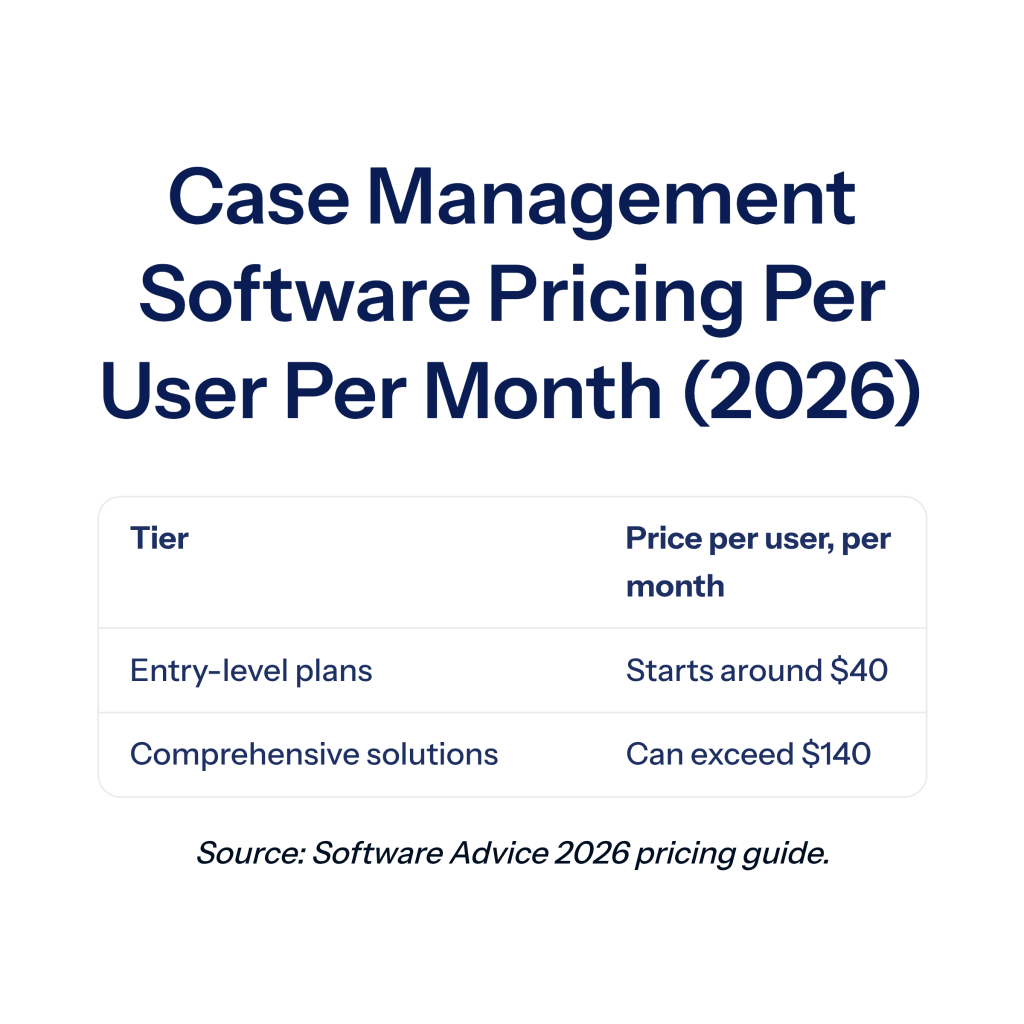
According to Software Advice’s 2026 pricing guide, entry-level plans start around $40 per user per month, while comprehensive solutions with advanced functionality can exceed $140 per user per month. Add implementation, data migration, and training on top. On-premises systems carry higher upfront costs but lower long-term per-user fees.
How long does implementation take?
A small firm can often go live in 30 to 60 days with a straightforward cloud platform. Mid-sized firms usually take 90 to 180 days, depending on data migration complexity and how many integrations are required.
Do we need case management software and document automation software?
Most litigation firms benefit from both. Case management is the system of record. Document automation handles the heavy drafting and document processing work that case management systems are not designed to do well. Platforms like our litigation document tools are built to connect with the case management systems firms already use.
Is cloud case management software secure enough for client data?
Yes, when the vendor meets recognized security standards. Look for SOC 2 Type II attestation, encryption in transit and at rest, two-factor authentication, detailed audit logs, and a clear Business Associate Agreement if you handle medical information. Most bar associations now treat properly configured cloud practice management as meeting ethical duties of competence and confidentiality.
Final thoughts
Choosing case management software is a decision that will shape how your firm works for the next five to ten years. The firms that get it right treat the selection as a structured process: they audit their current state, involve the people who will use the system, vet vendors against real workflows, and plan for implementation as seriously as they plan for the purchase itself.
Whatever system you choose, make sure it fits how your firm actually practices law. A platform that matches your workflow and integrates cleanly with the specialized tools you need (document automation, medical records processing, evidence management) will outperform a more feature-rich system that your team quietly works around.
If your firm is a civil litigation or personal injury practice weighing how AI-powered document automation and evidence management fit into your stack, schedule a free demo with DocuLex to see how we work alongside leading case management platforms.