
Many legal document automation tools are billed per user on a subscription, and others are priced by a quote the vendor prepares after asking about your firm. The license is only one part of what you’ll pay. Setup, template building, staff training and connecting the software to your other systems all add to it. So can usage charges and contract terms, such as a fee for leaving a multi-year contract early.
We don’t list prices here, for any product. Published prices change often. What a firm pays often depends on how many people need access and, with some tools, on how much material the software processes. And many vendors don’t publish a price at all; they quote. The way to get numbers you can compare is to ask every vendor the same questions, and we list them further down.
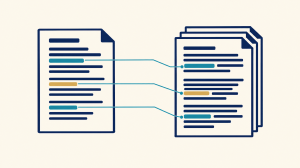
If the software drafts from your case record rather than filling in templates, add one more cost: the attorney time spent checking each factual statement against the record before anything is filed.
We build DocuLex, software for litigation firms that draft from large case records. Our co-founder is a practicing trial lawyer, so we count the time it takes to check a draft as part of what this software costs.
How is legal document automation software priced?
Vendors sell legal document automation software under four main pricing models. Attorney at Work notes that “specialized document assembly tools are typically billed per user seat on a subscription basis” (Attorney at Work). If a tool reads your case files, ask whether it also charges by the page or document.
| Pricing model | How it’s charged | What a litigation firm should check |
| Per seat | A monthly or annual fee for each named user | Whether paralegals, assistants and part-time staff each need a full seat, or can work at a lower rate |
| Usage-based | A charge per document, per page or per amount of processing | What one large matter costs to process |
| Flat or firm-wide license | One price for the whole firm, however many people use it | What’s included at that price, and what moves the firm to a higher tier |
| Quote-based | A price set after a conversation about the firm | What the quote is based on, and how it changes when the firm adds attorneys or matters |
Many vendors combine two of these models, for example a per-seat fee that includes a set number of pages, with a separate charge for pages beyond it.
Per-seat pricing can charge for non-attorney staff too. If three lawyers work with four paralegals and a records clerk, a per-seat price can apply to eight people, not three. Ask each vendor who counts as a user before you compare their numbers.
Many vendors quote instead of publishing a price because the price depends on the firm. The number of attorneys affects it, and so does the kind of work. A personal injury practice whose files include long medical records sends far more pages through the software than a practice drafting short contracts, and on usage-based pricing more pages means a higher price. A quote isn’t a warning sign on its own. It does mean you need the same information from every vendor before you can compare them.
What costs aren’t on the price page?
The costs that don’t appear on a vendor’s price page are mostly setup work and the staff time it takes to use the software well. Some are paid once and some recur. The last column is the question to ask the vendor about each.
| Cost | One-time or recurring | What to ask the vendor |
| Setup and data migration | One-time | Is moving our existing templates and matter data included, or billed as an implementation fee? |
| Building templates | One-time, then upkeep | Who builds them: our staff, your team or an outside consultant? |
| Training | One-time, plus each new hire | How much training is included, and what does more cost? |
| Integrations | One-time setup, sometimes a recurring fee | Does it connect to the systems we use for matters, documents and billing, and at what charge? |
| Usage beyond the allowance | Recurring | What is the allowance measured in, and what does each page or document beyond it cost? |
| Leaving the contract | At exit | What does leaving before the end of the term cost? |
| Getting your data back | At exit | Will we get our data in a usable format, and will you confirm its deletion in writing? |
Template work and training both take staff time. On templates, Attorney at Work describes the trade-off: “Automating templates yourself saves capital but requires internal time and training,” while “hiring an outside consultant requires an upfront fee, but accelerates deployment for complex document sets” (Attorney at Work). On training, a New Jersey State Bar Association publication names undertraining as a common reason projects stall: “Too often, those assigned to these projects receive minimal training, leading to stalled or inefficient efforts” (NJSBA). The time your attorneys and staff spend learning the software is a cost the firm carries itself.
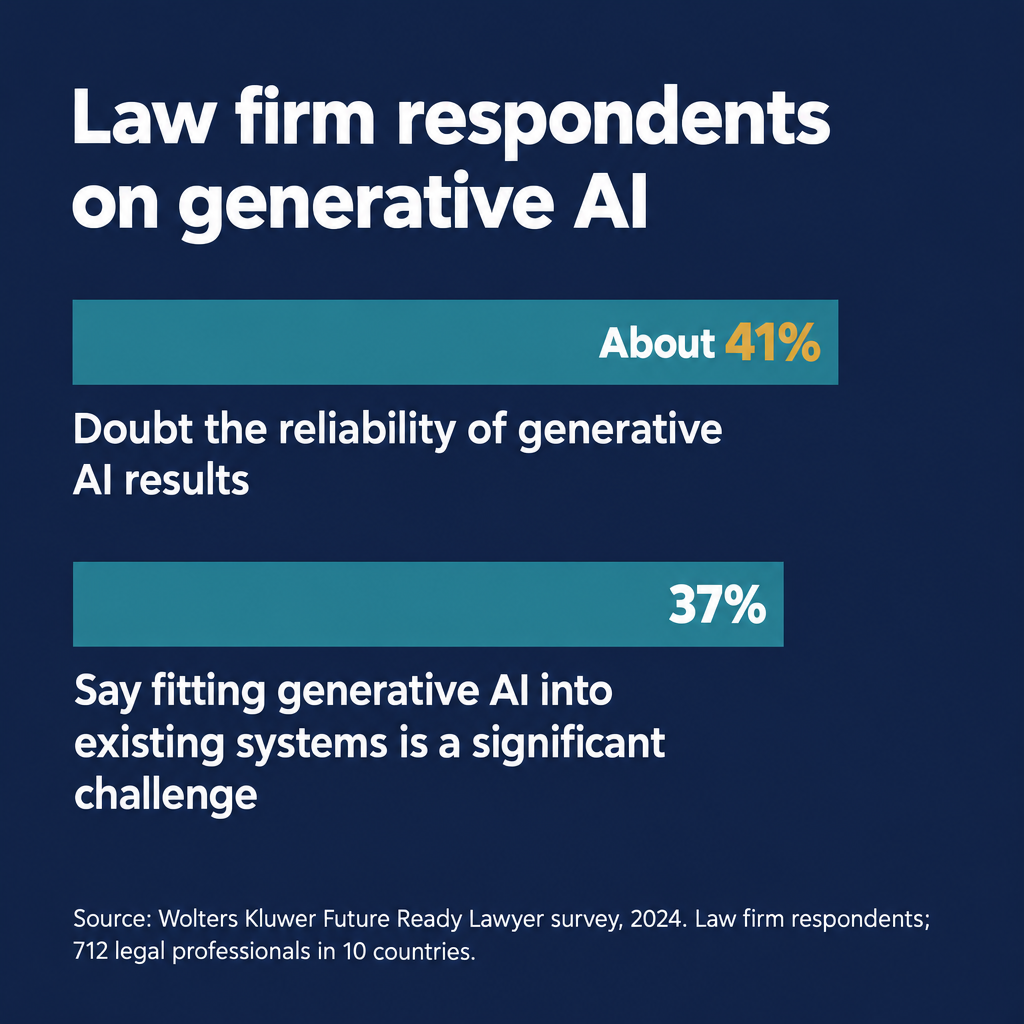
Integration can be a sticking point too, at least for AI tools. In Wolters Kluwer’s 2024 Future Ready Lawyer survey of 712 legal professionals in 10 countries, 37% of law firm respondents said fitting generative AI into their existing systems and workflows was a significant challenge (LawNext).
Is template automation the same purchase as AI drafting for litigation?
Template automation and AI drafting for litigation are different purchases with different costs and different risks. With template automation, most of the cost is the upfront work of building good templates. Once a template has been checked, every document it produces uses the same checked language, so review of each new document can focus on the details filled into it.
AI drafting for litigation works from the record itself, which in a personal injury or commercial case can run to thousands of pages of depositions, medical records and exhibits. The software writes new factual statements about the case. Each one has to be checked against the record before it goes into a filing, and that checking takes attorney time on every draft. Our legal document automation software page explains the difference in more detail, and our litigation support software page covers tools for working through a large case record.
What does it cost to check AI-drafted documents?
Attorney review time is a cost a vendor’s quote doesn’t cover. You can estimate it with your own figures:
- Time how long it takes an attorney to verify one AI-drafted document against the record.
- Multiply those hours by the attorney’s hourly rate.
- Multiply that by the number of drafts the firm expects each month.
- Compare that total with what the same drafts cost to write by hand: the hours they take, times the same hourly rate.
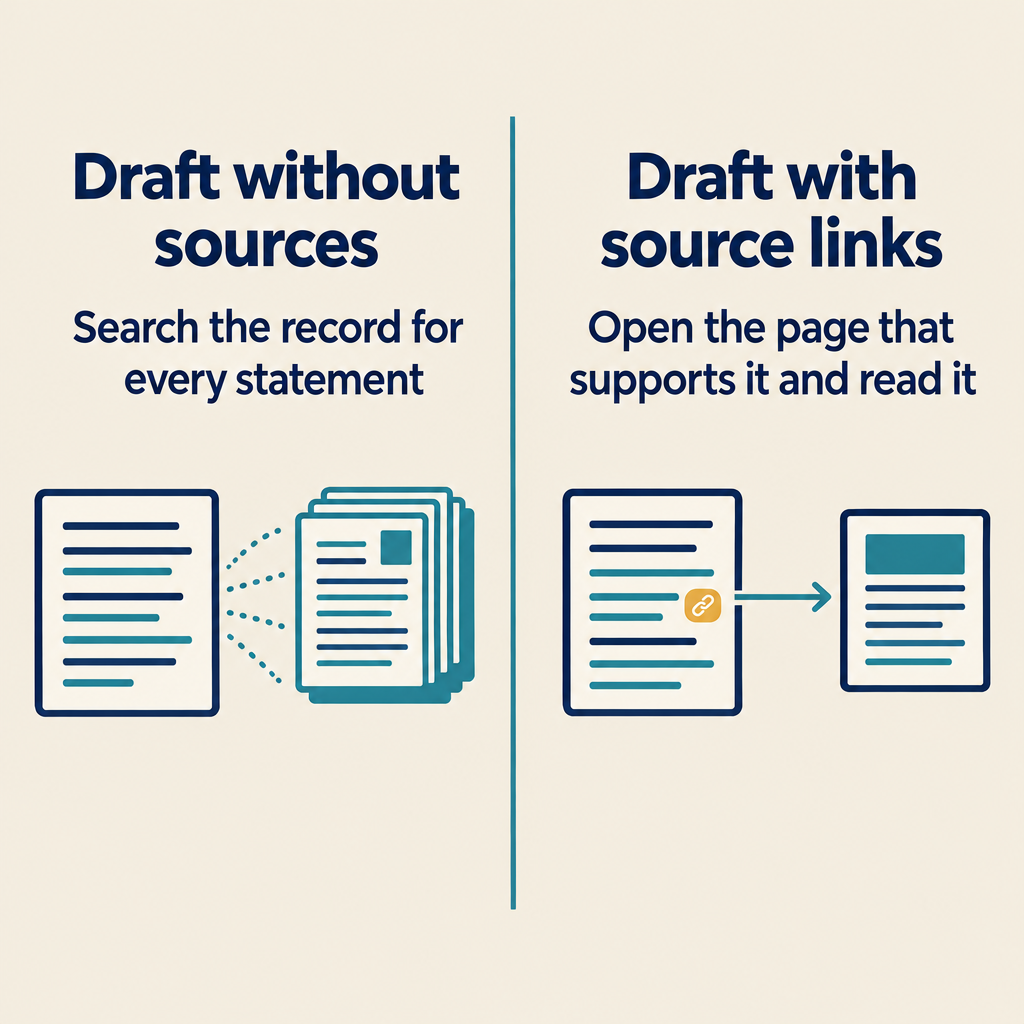
Run that number for each tool before comparing license fees, because review time differs from one tool to the next and can make a tool with a higher license fee cheaper overall. The difference is in what the draft shows you. If a draft gives you a paragraph of facts with no sources, checking it means searching the record for every statement. If each factual sentence links to the deposition page and line, the exhibit or the medical record that supports it, checking it means opening that source and reading it. You can test this in any vendor’s demonstration: pick a factual sentence in a draft and ask to see the page in the record that supports it.
Lawyers have to verify AI output to a degree that fits the tool and the task. ABA Formal Opinion 512, the ABA’s 2024 opinion on generative AI, calls for “an appropriate degree of independent verification or review of its output” (ABA Formal Opinion 512). Many lawyers also doubt the output: in the Wolters Kluwer survey cited earlier, about 41% of law firm respondents expressed doubts about the reliability of generative AI results.
Our co-founder, Jason Melancon, learned why that check matters in 2022. He is a trial lawyer who has spent seventeen years on one document-intensive case that is still being tried. He asked an AI tool for help with a brief in an area of Louisiana damages law he knew well, and it produced a case that said exactly what he needed. He checked the citation anyway. It led to an unrelated Alabama case in a different area of law. The case the tool had described did not exist. As he puts it, “An AI system that writes quickly but without adequate understanding of the record and context can produce mistakes more efficiently too.”
When lawyers skip that check, courts sanction the lawyers who drafted or signed the filing, and sometimes their firm. The fines in these three cases were modest. In two of them, the court also removed lawyers from the case, and in one it referred them to the state bar.
| Case | Court and date | What the court ordered |
| Mata v. Avianca | S.D.N.Y., June 22, 2023 | A $5,000 penalty on two attorneys and their firm for a filing that cited cases an AI tool had made up. The court found bad faith on the part of the individual lawyers and ordered them to send letters to their client and to each judge falsely named as the author of a fake opinion (opinion and order). |
| Wadsworth v. Walmart | D. Wyo., February 24, 2025 | A motion in limine cited eight cases that didn’t exist. The attorney who drafted and signed it was fined $3,000 and had his permission to appear in the case revoked. Two other attorneys who signed it were fined $1,000 each (Bloomberg Law). |
| Johnson v. Dunn | N.D. Ala., July 23, 2025 | Three attorneys were publicly reprimanded over fabricated AI-generated citations, disqualified from the case and referred to the Alabama State Bar (order). The judge imposed no fine, writing that “a fine and public reprimand are insufficient here”; the disqualification and the bar referral were the heavier penalty (1819 News). |
What should a firm handling medical records require from a vendor?
Any document automation vendor that will process your clients’ medical records should handle them in compliance with HIPAA. Ask whether that handling is included in the price or sold as a higher tier.
HHS guidance on cloud computing says that when an organization covered by HIPAA uses a cloud service provider to handle electronic health records, the two “must enter into a HIPAA-compliant business associate agreement (BAA)” (HHS). Whether that applies to your firm and your vendor depends on how you receive and hold the records, so ask your own counsel. Then ask every vendor whether it will sign a BAA.
Beyond the agreement, ask for these in writing:
- Records encrypted in transit and at rest
- No copies of your records kept by any outside AI service after it processes them
- No use of client materials to train AI models
- The ability to export your data in a usable format
- Deletion of your data when you ask, with written confirmation
Whether a vendor trains AI models on client data also affects what you owe your clients. ABA Formal Opinion 512 says that for AI tools that learn from what users put into them, “a client’s informed consent is required prior to inputting information relating to the representation into such a GAI tool.” For other tools, the opinion leaves the lawyer to weigh the confidentiality risk. Our data security and AI medical records processing pages describe how we handle medical records.
Can a firm bill clients for legal document automation software?
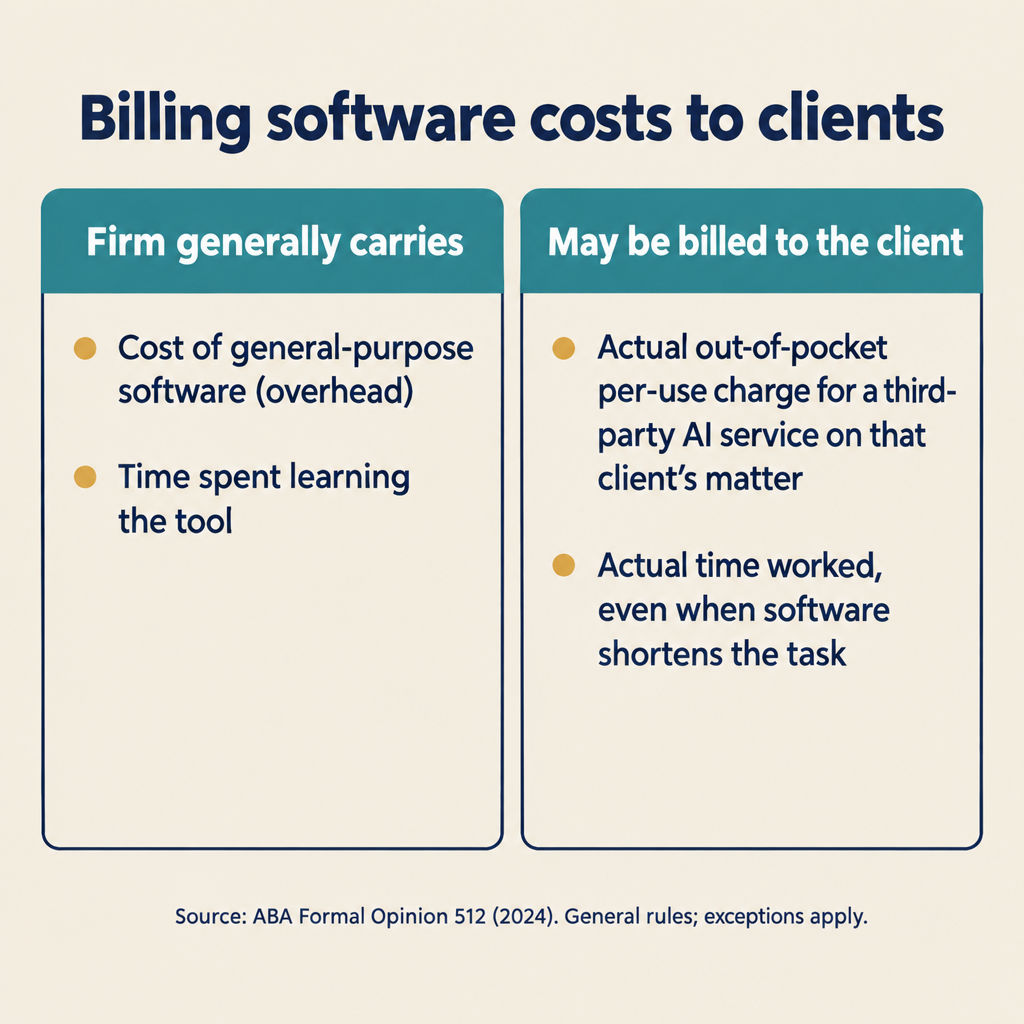
A firm generally can’t bill clients for general-purpose software, because ABA Formal Opinion 512 treats its cost as overhead. The opinion makes four billing points:
- General-purpose tools are overhead. When a tool works like the rest of the firm’s office equipment, the opinion treats its cost as overhead that isn’t charged to the client, unless the lawyer told the client otherwise in advance.
- Some per-use charges can be passed through. When a third-party AI service charges per use for work on one client’s matter, the opinion says it would ordinarily be reasonable to bill that client for the actual out-of-pocket cost.
- Hourly billing covers actual time. “Lawyers who bill clients an hourly rate for time spent on a matter must bill for their actual time,” and the D.C. Bar’s Ethics Opinion 388 says the same. If the software shortens a task, the bill for that task is shorter.
- Learning the tool generally isn’t billable. A lawyer generally may not charge a client for time spent learning an AI tool the lawyer will use regularly. The exception is a client who asks the lawyer to use a specific tool the lawyer doesn’t know.
For budgeting, plan on the firm carrying the license, the setup and the training time itself.
How do you compare the total cost of legal document automation software?
Ask every vendor the same questions and put their answers side by side in one budget:
- What is the full first-year cost, including setup, data migration, template work and training?
- Who needs a seat, and do paralegals and staff pay the same rate as attorneys?
- What usage is included, and what would one matter with several thousand pages of records cost to process?
- Which of our current systems does it connect to, and is that connection an extra charge?
- How long is the contract, what does leaving early cost, and in what form do we get our data back?
- Will you sign a business associate agreement, and is HIPAA handling included at this price?
- Is our data kept after processing, or used to train any model?
- When the software states a fact, can an attorney open the page in the record that supports it?
- Will you show us a draft built from a realistic record, including the evidence that contradicts our theory?
Questions 8 and 9 tell you how much review time to expect. If a draft leaves out the evidence that contradicts your theory, an attorney still has to search the record for that evidence. Anything the search misses can come up first in opposing counsel’s response.
Is legal document automation software worth the cost?
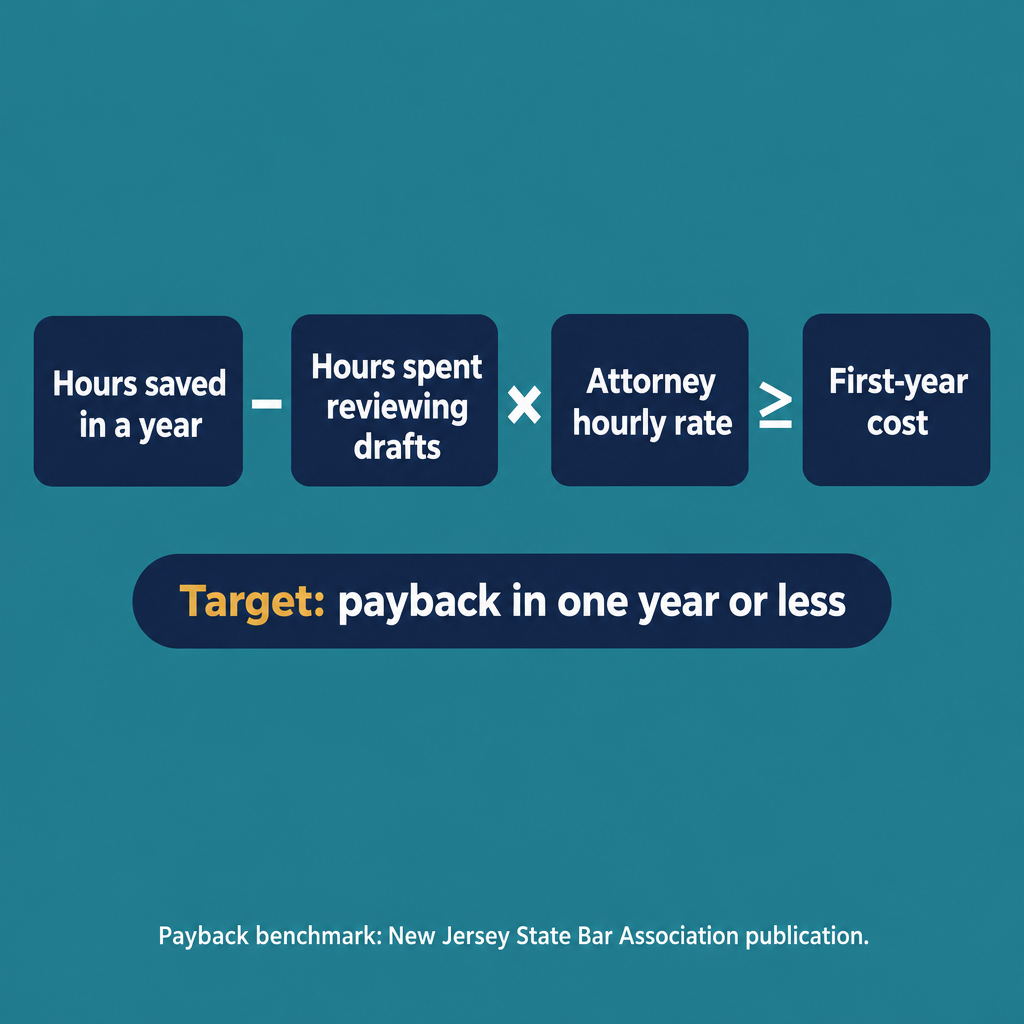
Legal document automation software is worth the cost if the attorney time it saves pays back what it costs within about a year. That benchmark appears in the same New Jersey State Bar Association publication: “With technology projects, most experts agree that you should look for payback periods of one year or less” (NJSBA). To test a tool, add up its first-year cost. Then estimate the attorney hours it saves in a year, subtract the hours spent reviewing its drafts, and multiply what’s left by the attorney’s hourly rate. If that figure is at least the first-year cost, the tool meets the standard. If checking a draft takes as long as writing it by hand would have, the software saves no hours and won’t pay for itself.
What does DocuLex cost?
DocuLex pricing is provided on request. It reflects the number of attorneys, the composition of the firm’s litigation practice and the needs of its matters. We don’t publish rate cards.
DocuLex is Evidence-First Litigation Intelligence. An attorney can open any factual sentence in a DocuLex draft and see the passage in the record that supports it. The attorney can also open the evidence that contradicts that sentence, and see both before deciding what to file.
If you’re building a budget and want to see a draft whose facts link to the record, we’ll show you one on a realistic sample matter. The demonstration includes the evidence that hurts the theory. Request a Private Demonstration.
Start with the record. Test what it proves. Draft what you can verify.